CHEXX Singapore Guide
Mobile access guide
CHEXX App and Mobile Play: PWA, Desktop and Telegram
CHEXX does not currently need a conventional App Store or Google Play download to provide app-like access. CHEXX supports a progressive web app, or PWA, for browser-based installation, separate Windows and macOS desktop clients, and a Telegram Mini App through @ChexxBetBot. CHEXX does not list a native iOS or Android store app, so a similarly named App Store or Google Play listing should not be assumed to belong to this casino.
For a Singapore reader, the practical distinction is simple: browser access and PWA installation use the official CHEXX web service, while Telegram is a separate access surface inside Telegram. Account creation, crypto funding and the game catalogue remain separate decisions, covered in the CHEXX registration, CHEXX payment methods and CHEXX casino games guides.
What “CHEXX app” means in practice
The word “app” can describe several different delivery formats, and that is the main source of confusion around CHEXX. A native store app is software distributed through Apple App Store or Google Play. A PWA is a website that can be installed from a supported browser so that it opens from a home-screen or desktop icon with a more app-like presentation. A Telegram Mini App runs within Telegram rather than as a separately installed casino application.
CHEXX’s PWA page labels the product “CHEXX app” but gives browser-based installation instructions. That wording is important. It means seeing the word “app” on an official CHEXX page does not by itself prove that a native App Store or Google Play package exists.
| Format | CHEXX position | How to interpret it |
|---|---|---|
| Normal website | Available | Open CHEXX in a supported browser without installing anything. |
| PWA | Listed by CHEXX | Install the official web service to a home screen or desktop from the browser. |
| Telegram Mini App | @ChexxBetBot | Use the CHEXX service through the listed Telegram Mini App. |
| Windows/macOS desktop clients | Listed by CHEXX | Separate desktop access modes in addition to browser/PWA use. |
| Native iOS store app | Not listed by CHEXX | Do not assume an App Store listing with a similar name is connected to CHEXX. |
| Native Android store app | Not listed by CHEXX | Do not treat a Google Play search result as official without confirming publisher and domain ownership. |
Current PWA support on phones and computers
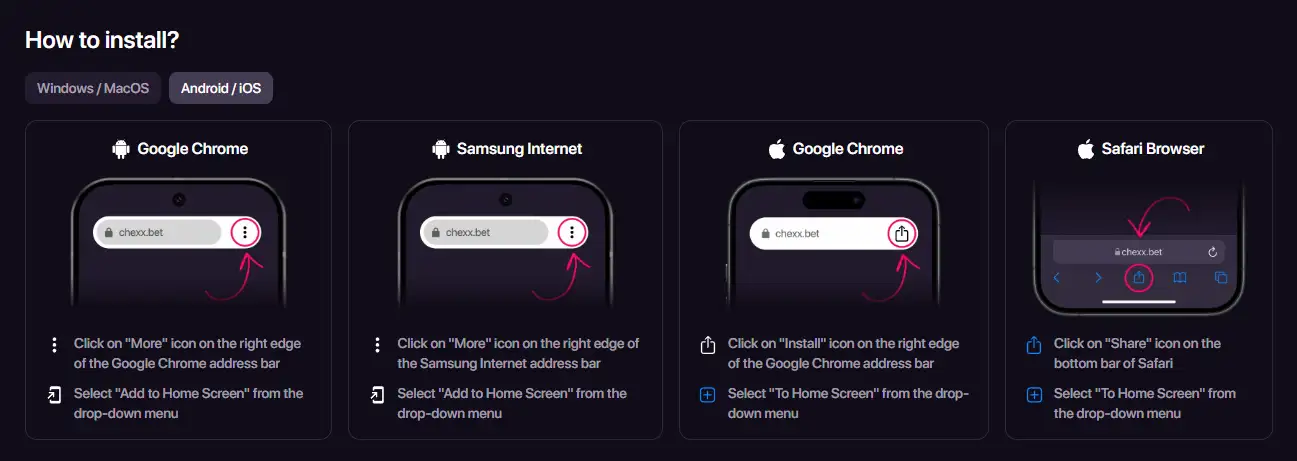
CHEXX’s PWA guide lists Google Chrome across Android, iOS, Windows and macOS. It also lists Safari on iOS and macOS and Samsung Internet on Android. The installation control differs by browser, but the concept is consistent: start from the official CHEXX website and use the browser’s install, add-to-home-screen or add-to-dock function.
On Android, the guide describes installation through Chrome or Samsung Internet. On iOS, it documents Chrome and Safari. On Windows, it documents Chrome installation. On macOS, it documents Chrome and Safari, with Safari using an add-to-dock flow. These are ordinary PWA installation actions and not instructions for downloading an APK or bypassing a platform restriction.
If the expected install control is not present, continuing in the browser is the clean fallback. This guide does not recommend unofficial APK files, mirror downloads, altered packages or region-bypass methods.

PWA versus a native casino app
A PWA can feel similar to a native app because it can sit on a home screen, launch in its own window and use browser-supported notifications. It is still delivered by the web, so updates can appear without a separate store update cycle. That can reduce version-management friction, but it also makes domain verification more important because the installation starts from a website.
A native store app has a publisher page, store listing and package identity that can be checked independently. CHEXX’s mobile material instead emphasises its PWA. For a reader searching “CHEXX app”, the safest interpretation is therefore “official CHEXX web app” unless CHEXX itself provides a verifiable store link from its own domain.
CHEXX also lists macOS and Windows desktop clients. Those desktop modes sit alongside browser and PWA access. No official installer path is provided here, so there is no download link or step-by-step desktop installation sequence.
Telegram Mini App access through @ChexxBetBot
CHEXX’s Telegram route is identified by the game bot handle @ChexxBetBot. This gives CHEXX another mobile surface without requiring a store-installed casino app.
The decision question is whether you want gambling access embedded inside a messaging app. Convenience is the obvious advantage, but account and wallet discipline still matter. Verify the bot handle before opening it, avoid links forwarded by unknown accounts, and treat the Telegram surface as access to the same gambling product rather than as a separate low-risk version of it.
Why similarly named app-store listings need extra scrutiny
CHEXX does not list a native iOS or Android store app. Name matching alone is therefore not enough to identify an official CHEXX product; the documented mobile routes are the website/PWA and Telegram Mini App, with separate desktop clients for MacOS and Windows.
Before treating any store listing as a CHEXX casino app, check three things: whether the official CHEXX domain links to that listing, whether the listed publisher matches an operator or company relationship published by CHEXX, and whether the product description actually matches the casino and sportsbook service. If those checks fail, the sensible conclusion is not “probably official” but “not confirmed as official”.
- Do not install a package merely because its title contains CHEXX.
- Do not use APK mirrors as a substitute for an official distribution link.
- Do not enter account credentials into a lookalike app whose publisher relationship cannot be confirmed.
- Start from the official CHEXX web domain when using the PWA route.
Mobile usability: what to evaluate before using real funds
Installation is only one part of mobile quality. A useful evaluation should check whether login controls, wallet addresses, network labels, game filters and sportsbook prices remain readable on the actual screen size you use. Crypto transactions in particular are unforgiving of address or network mistakes, so a compact mobile layout should never encourage rushed confirmation.
It is also worth testing the product before adding a large balance. Navigate the lobby, open account settings, inspect the wallet flow without submitting a transfer, and confirm that important text is readable without accidental taps. If the interface feels cramped or ambiguous, the installed icon does not make that problem disappear.
For gameplay itself, the game catalogue guide explains categories and providers. For wallet mechanics, the crypto payment options page separates deposit and withdrawal considerations from the mobile interface.
Browser, PWA or Telegram: which route is the clearest?
Use the browser when
You want the fewest installation steps, are evaluating the service for the first time, or do not need a home-screen icon.
Use the PWA when
You already use the official web service and want faster repeat access from a phone or computer without relying on an app store.
Use Telegram when
You intentionally prefer the Telegram environment and have confirmed that you are launching @ChexxBetBot rather than a lookalike account.
None of these formats changes the underlying decision about whether to gamble or how much to spend. App-like convenience can increase the frequency with which a service is opened, so a spending limit and a deliberate session boundary matter at least as much on mobile as on desktop.
Singapore context is separate from device compatibility
Being able to install a PWA or open a Telegram Mini App does not answer whether a remote gambling service is locally authorised. Singapore regulatory status is separate from device compatibility and installation format. Device access and legal authorisation are different questions.
The broader licence and local-risk analysis belongs in the CHEXX licence and trust guide. This page is limited to the listed access formats and does not provide instructions intended to bypass blocking, payment controls or geographic restrictions.
Mobile decision checklist
- Verify the starting point: use the official CHEXX domain for PWA installation or the @ChexxBetBot handle for Telegram.
- Identify the format: a PWA is not the same thing as a native App Store or Google Play app.
- Ignore lookalikes: matching names are not proof of publisher identity.
- Test readability: check wallet networks, account controls and game or market information on your actual device.
- Keep account security separate: use the account setup guide for login and registration choices.
- Keep legal status separate: installability does not settle Singapore authorisation.
Frequently asked questions
Does CHEXX have an iPhone or Android store app?
CHEXX does not list a native App Store or Google Play casino app. On phones, the listed app-like route is the browser-installed PWA.
What desktop access does CHEXX list?
CHEXX lists Windows and macOS desktop clients and also documents PWA installation through supported desktop browsers.
What is the CHEXX Telegram bot?
The listed handle is @ChexxBetBot. Check the handle carefully before launching a bot from a forwarded message or search result.
Should I download a CHEXX APK from another website?
No. This guide does not recommend unofficial APKs or mirror packages. The browser-based PWA does not require that workaround.
Related CHEXX guides
If the access format is clear, the next useful step is the CHEXX account setup guide. Return to the CHEXX Singapore review if you want the wider Singapore-facing assessment first.
The full picture is in our CHEXX review for Singapore.
An account comes first: registration.
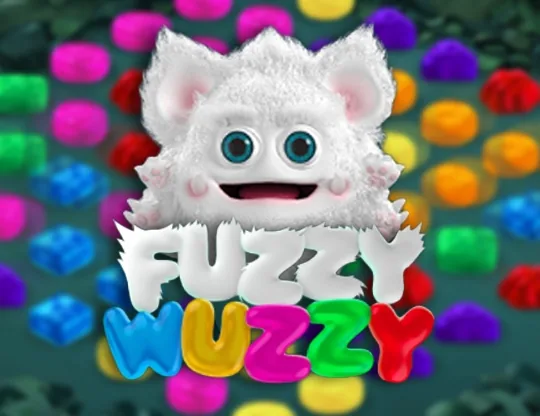 Fuzzy WuzzyPoggiPlay
 Sweet BonanzaPragmatic Play
 Boogie BoomBooming Games
 Maneki FortunesSkywind Group
 Trickstar SpinsYggdrasil Gaming
 40 Super HotEGT Digital
 Love Gems Hold and Win1spin4win
 Romance VFugaso
 Hot Hot BalloonsArmadillo Studios
 Wong ChoySpadegaming
 Sweet FTNGameArt
 Book of the SunPascal Gaming
 Sizzling Hot DeluxeNovomatic
 Sugar RushPragmatic Play
 Wild PharaohSwintt
 Multihand BlackjackMultihand
 Turbo BlackjackFast-play
 European BlackjackMultihand
 Blackjack Lucky LadiesSide Bet
 Vegas Strip BlackjackClassic
 Single Deck Blackjack GoldSingle Deck
 Vegas Downtown Blackjack GoldGold Series
 Blackjack Surrender OriginsSurrender
 Double Exposure BlackjackDouble Exposure
 Quantum Blackjack PlusMultiplier
 Perfect Pairs BlackjackSide Bet
 Classic BlackjackClassic
 Ultimate Blackjack with RachaelLive-style
 American BlackjackClassic
 Atlantic City BlackjackClassic
 Who Wants to Be a Millionaire RouletteThemed
 Mini Roulette 3DMini
 American RouletteClassic
 Gold RouletteGold Series
 Mega Fire Blaze RouletteMultiplier
 European RouletteClassic
 French RouletteNetEnt
 RouletteRelax Gaming
 Auto RouletteSwitch Studios
 Immortal Romance RouletteThemed
 Lucky RouletteClassic
 Roca Riches RouletteThemed
 Double Ball American RouletteDouble Ball
 Dragon RouletteThemed
Prepared by the Chexx Casino editorial staff.